Matter AI - The AI assistant inside every LEAP matter
Get instant answers from your matter
Matter AI reads every document, email and attachment in your LEAP matter, including scanned PDFs and handwritten notes, and answers with references you can check. It shows its reasoning, turns answers into first drafts, and draws on LawY when your question needs legal research.
:quality(70))
How it works in LEAP
Open Matter AI from any matter. Chat about the whole matter, a single document or a folder, depending on what your question needs.
Switch to Comprehensive mode and Matter AI shows each step: how it reads your question, searches the matter and retrieves documents.
Every answer cites the documents it used. Preview them from the answer, and see exactly what’s loaded with Document Status.
Edit any part of the response, generate a first draft in Word, PDF, Excel or PowerPoint, and save it straight to the matter.
New in Matter AI
Matter AI has had its biggest year yet. It now reasons in the open, asks before it assumes, turns answers into working documents and brings LawY’s legal research into the same window.
:quality(82))
All Agent: matter facts and legal research, together
All Agent is a dedicated Matter AI workspace that brings Agentic Chat, deeper reasoning and LawY-powered research into one place. It reasons through your question step by step, showing its thinking as it works.
Where your question calls for legal research, it draws on LawY automatically, returning cited legal sources alongside the facts of your matter. It’s built for hybrid questions that involve both.
One workspace, no switching between tools
Cited legal sources make answers traceable and audit-ready
Works for lawyers, paralegals and legal operations alike
:quality(82))
Agentic Chat with AI Document Generation
Switch from Fast to Comprehensive and Matter AI shows the steps it takes to analyse your question, search your matter and retrieve documents. This is especially useful for complex questions and multi-document analysis.
Then turn the response into a usable first draft: Word documents, PDFs, Excel spreadsheets or PowerPoint presentations, ready to preview, download or save back into the matter.
:quality(82))
Choose the AI model and clarifying questions
Different matters demand different levels of reasoning, speed and depth. The Model Selector lets you choose from leading models by OpenAI and Anthropic, directly in the chat. Pick a faster model for everyday queries or a deeper reasoning model for complex legal analysis.
A short prompt like “draft a brief” leaves a lot unsaid. Agent Chat now asks a brief set of questions first, covering only what it can’t work out from your prompt or your matter: the format, the audience, the jurisdiction, who you act for. Answer once and it remembers for the matter.
AI your firm can control
Matter AI cites the documents behind each answer, and you can preview them without leaving the response.
See which documents are loaded, still loading, failed or excluded, and exclude any document from future responses.
Choose the AI model and switch between Fast and Comprehensive answers to match the task.
For questions of law, Matter AI draws on LawY for cited answers verified by qualified Australian lawyers.
Your matters, answered
See Matter AI work through a real matter: referenced answers, visible reasoning and first drafts, all inside LEAP.
What Matter AI can do from any matter
Search details, dates, appointments and documents, with OCR for scans and handwritten notes.
Summarise documents or whole folders, and build a matter chronology.
200+ prompts for Affidavits, Letters, Statutory Declarations and Briefs, in Matter AI for Word.
Send drafts to Outlook with recipient, subject and content populated.
Analyse multiple documents or folders to find differences and inconsistencies.
Select any part of a response, regenerate just that section, or refine it inline.
Ask questions about the financial transactions recorded in the matter.
Turn answers into Word, PDF, Excel or PowerPoint first drafts.
:quality(82))
Find answers within your matter
Matter AI can search contact information, critical dates, and appointments within your matter. It will intelligently scan your documents, emails, and attachments, even performing OCR on images, scanned PDFs and handwritten notes. From 10 to 10,000+ documents, receive a detailed response along with references to the specific files in seconds.
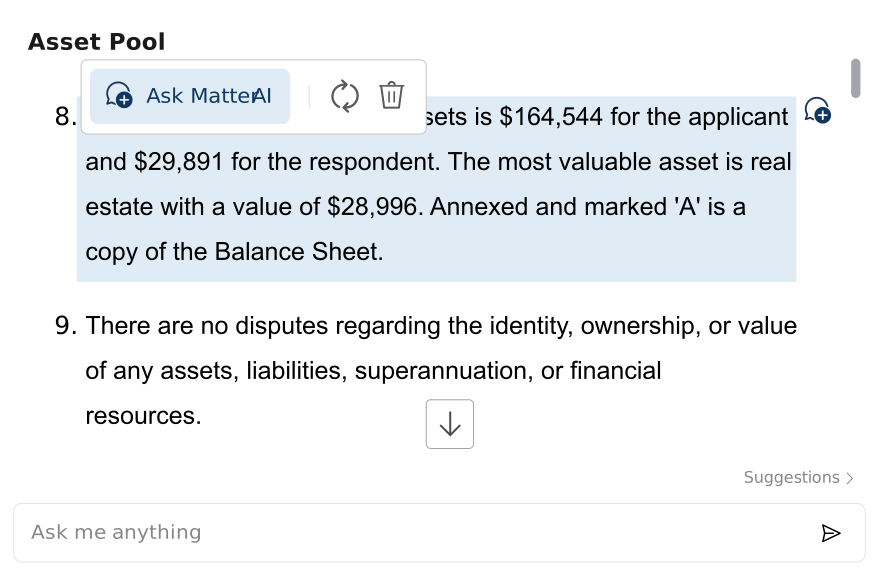
Inline editing of AI answers
Easily edit AI-generated answers directly within the response, giving you full control over how content is shaped. Make precise adjustments to tone, language or structure without needing to regenerate the entire answer.
You can expand key points, clarify legal reasoning, or remove material that is irrelevant. All changes are made inline, so you remain in the flow of drafting without interruption.
:quality(82))
Smarter drafting with LEAP’s AI Prompts
Create detailed legal documents using LEAP’s Matter AI for Word add-in, directly within Microsoft Word. Each AI Prompt offers guidance on formatting, annexures or exhibit lists, practice direction compliance, context, style, and tone.
Access LEAP’s library of over 200 AI Prompts covering essential document types, including Affidavits, Letters, Statutory Declarations, Briefs to Counsel, and more.
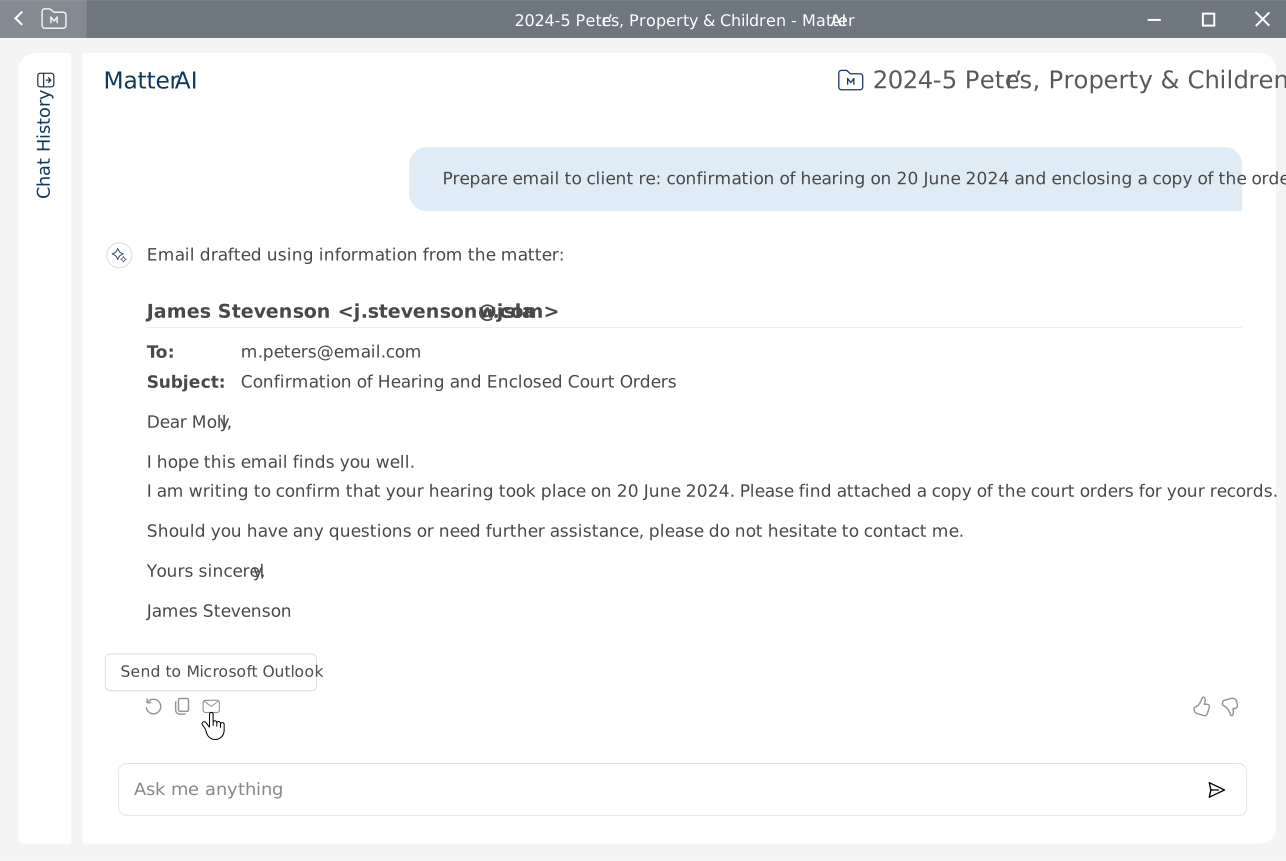
Send draft emails directly to Microsoft Outlook
Leverage Matter AI to analyse your matter details and generate customised, professional emails and documents in a fraction of the time. Send drafts to Microsoft Outlook with the recipient’s email, subject and content instantly populated.
Compare multiple documents and folders
Manual comparison can be time consuming and prone to human error. Select one or more documents from your matter and let Matter AI analyse them to find differences and inconsistencies.
Talk to us about Matter AI
Whether you’re a sole practitioner or a large firm, see what Matter AI can do for your matters.